Low-cost Workflow for
Cloud Storage
This low-cost cloud storage workflow uses Google Forms, Google Drive, Apps Script, Dropbox, and Slack to automate file uploads, enforce standardized naming, organize storage, and notify teams without the need for expensive DAM platforms.
Managing Digital Assets without DAM
(Google Cloud–Based Storage)
This approach demonstrates how small teams can manage digital assets efficiently using cloud-native tools instead of a dedicated DAM system.
Tool kit
-
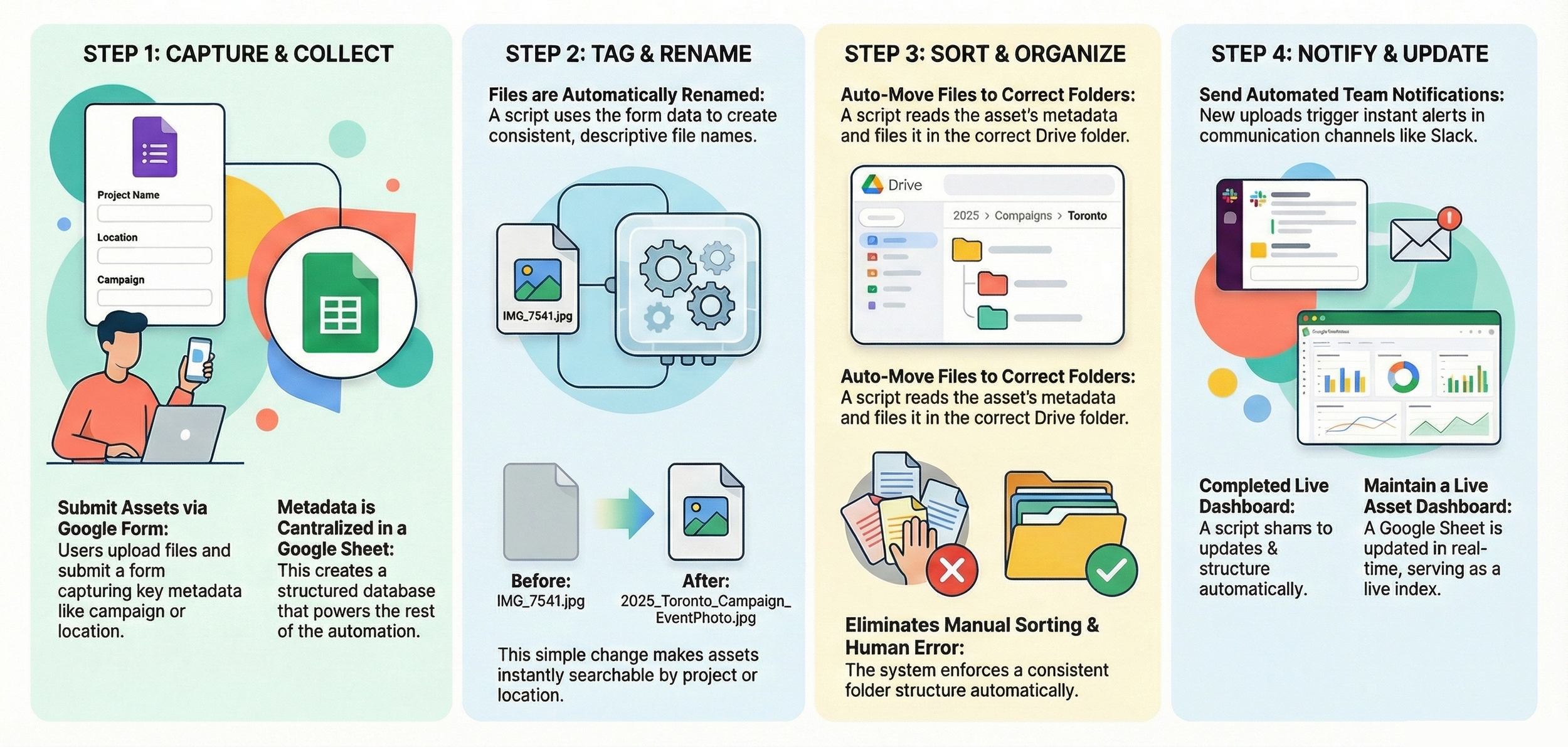
When a user uploads a new asset, they are required to submit a Google Form alongside the file upload.
The form captures essential metadata such as campaign, location, year, and usage rights, ensuring important context is not lost when files are uploaded.
All submitted metadata is stored in a linked Google Sheet, which serves as the structured data source for the automation workflow.
-
Each new submission is processed using Google Apps Script, which reads the form data and automatically renames the uploaded file using a structured naming convention (for example: 2025_Toronto_Campaign_EventPhoto.jpg).
The same metadata is written into the file’s description field in Google Drive, enabling Drive’s search functionality to index key attributes such as campaign and location.
As a result, assets become easily searchable, allowing users to find files using meaningful terms rather than generic filenames.
-
Once each file is uploaded and tagged, another Apps Script takes over to keep everything organized automatically.
The script looks at the metadata stored in the Sheet — for example, fields like Region, Year, and Campaign — and uses that information to decide exactly where each file belongs in Google Drive.For instance, a photo tagged as “Europe 2025 Launch” would automatically move to the folder path
/Assets/Europe/2025/Launch.
The logic follows a simple taxonomy you can customize to your organization’s structure — such as by department, region, project, or content type.This automation keeps the shared drive tidy, ensures consistency, and prevents duplicate or misplaced files.
Team members don’t need to manually drag items into folders; everything ends up in the correct place within seconds of form submission.
It also means that when someone searches or browses later, every asset lives in the right context — ready to find, reuse, or archive.So this step eliminates human sorting effort and enforces structure across the entire library, giving you order without manual labor.
-
The final step keeps everyone in the loop — automatically. After a new file is uploaded, tagged, and organized, the workflow triggers an update notification system.
This can be handled through Zapier, Google Apps Script, or even Power Automate, depending on your setup.For example, when an asset is added to the shared drive or its metadata is updated, a message can be sent directly to your team’s Slack channel, such as #creative-assets or #marketing-updates.
That message might include the file name, its new folder location, and a quick summary of key metadata like campaign, region, or asset type.In parallel, the same event can update a Google Sheet dashboard — adding a timestamped record of new uploads. This serves as a live index of all digital assets and helps teams track content inflow, status, and ownership in real time.
By doing this, no one has to check folders manually or ask “Has the new campaign photo been uploaded yet?” Notifications bring the information to where the team already works — Slack, Sheets, or even email — keeping collaboration tight and efficient.
Key Benefits
-

01 Low-Cost, Serverless DAM
Low-cost DAM functionality using serverless cloud tools, eliminating the need for expensive platforms or on-premise infrastructure.
-

02 Modular & Scalable Automation
Modular and scalable automation that integrates seamlessly with Google Workspace, Zapier, Slack, and Dropbox as needs evolve.
-

03 Searchable, Structured Assets
Improved asset discoverability and control through automated metadata, consistent naming, structured folders, and searchable indexing.
Who This Workflow Is For & How It’s Used
Small Teams & Startups
Small, growing teams that need structured asset management without the cost or operational overhead of enterprise DAM platforms.
-
Marketing and campaign assets
Product images and brand content
Social media and internal documentation
DMOs, Non-Profits & Public Sectors
Organisations managing large volumes of media with limited technical resources and a need for consistency and transparency.
-
Tourism and destination marketing assets
Event photography and video libraries
Public communications materials
Academic & Research Institutions
Universities and research teams handling diverse media, documentation, and long-term project outputs.
-
Research media and fieldwork outputs
Teaching and learning resources
Archival collections and repositories
“The automated workflow has made the process much easier to follow. Files are consistently named and organised, which has significantly improved how we search for and manage our assets. Compared to the previous manual approach, this saves time and reduces errors.”